 Open the full-size preview
 Open the full-size preview
Record a dated personal balance sheet
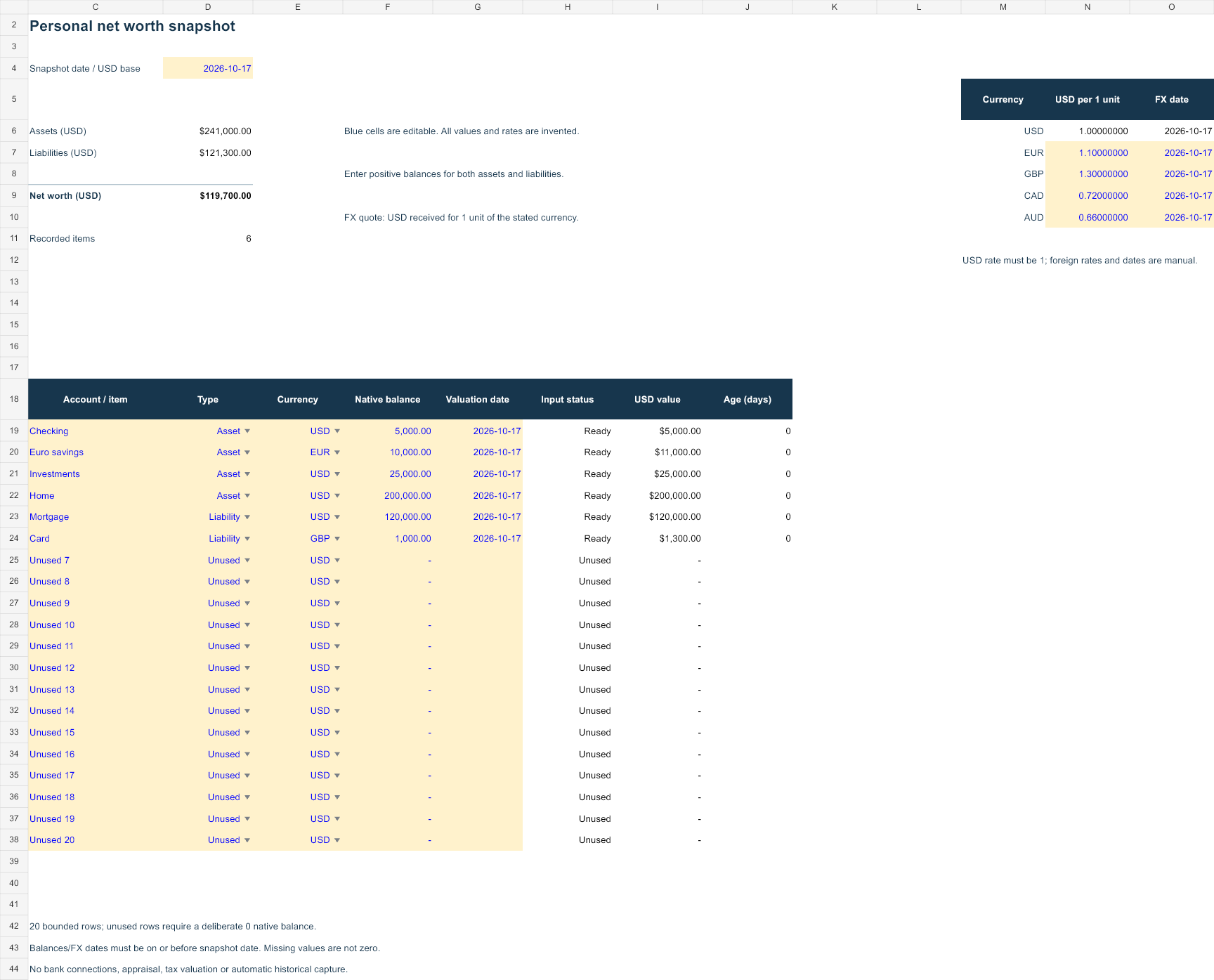
Net worth contains twenty bounded account/item rows. Enter a unique label, Asset or Liability, a currency, a nonnegative native balance and a valuation date. Liabilities are entered as positive balances and subtracted once in the summary. An item marked Unused must have a deliberate zero balance.
The visible FX table supports USD, EUR, GBP, CAD and AUD. The quote is USD per one unit of the stated currency: an entered EUR rate of 1.10 turns EUR 10,000 into USD 11,000. The USD rate must remain 1. Foreign rates and their dates are manual inputs, not a market feed. Currency/valuation dates must be on or before the snapshot date.
Reproduce the invented snapshot
Checking cash of USD 5,000, euro savings worth USD 11,000, investments worth USD 25,000 and a home worth USD 200,000 produce USD 241,000 assets. A USD 120,000 mortgage and a GBP 1,000 card balance translated at 1.30 produce USD 121,300 liabilities. Assets less liabilities give USD 119,700 net worth.
Amounts are rounded to cents after translating each balance. The file shows the age in days of each entered valuation. It does not estimate a property value, discover a bank account, verify a debt payoff amount or decide a tax valuation. Reconcile your dated inputs to source statements and avoid recording the same investment account both as a total and as its individual holdings.
Preserve history as separate snapshots
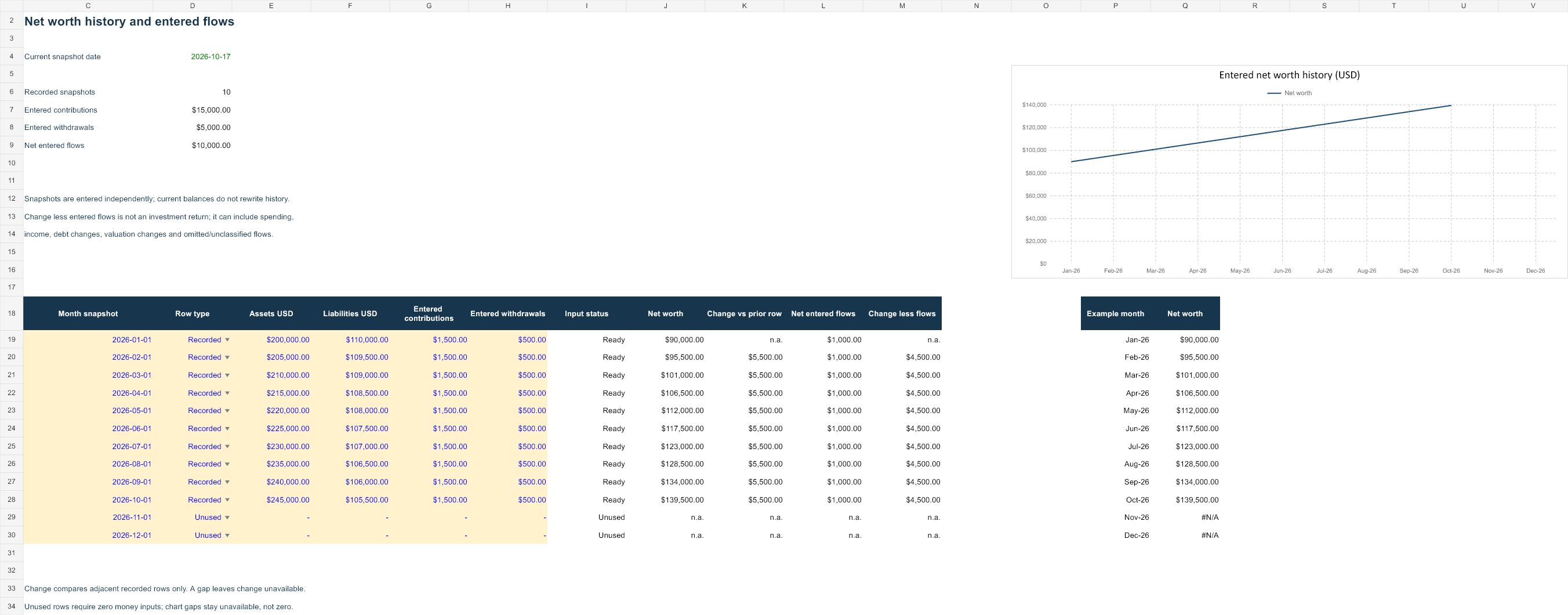
History contains twelve manually entered monthly rows. Recorded rows have a first-of-month snapshot date, assets, liabilities, entered contributions and withdrawals, all in USD. Recorded dates must increase in row order. Unused rows have zero money inputs. The invented example records January through October; November and December remain unused chart gaps.
Net worth is assets less liabilities. Change compares adjacent recorded rows. Net entered flows are contributions less withdrawals. Change less entered flows is a residual, not an investment return: it can include income, spending, changes in debt, prices and unclassified flows. The first recorded row has no prior-row change. A gap leaves the adjacent change unavailable rather than bridging it silently.
Know what is not linked
The current snapshot does not fill the history automatically. This preserves prior entries when current balances change. The example’s current and historical numbers are independent teaching data; they are not expected to match as one continuous account. Save dated copies and record your own consistent snapshot boundaries.
The file does not compute time-weighted return, IRR, total investment return, inflation adjustment or tax liability. Extending beyond twenty current rows or twelve history rows requires updating every bounded formula, validation and chart range. A row typed below the model is not included automatically.
Open, edit and verify your copy
Open in Microsoft Excel and save a dated working copy before replacing blue inputs. Native Excel recalculation, representative edits and save/reopen were checked in disposable copies. Missing required inputs differ from a deliberate zero. Read the row status and restore valid inputs before relying on a complete total.
XLSX can be imported into other spreadsheet applications, but native Google Sheets layout, formulas and charts have not been tested here. Inspect a converted file before using it. Your records stay on your device or chosen storage service; this site does not accept uploads or account credentials. Normal hosting can log page and download requests.
Definitions and primary sources
Investor.gov: Figure out your finances · Investor.gov: Asset allocation and rebalancing · FINRA: Return and rate of return · IRS: Dividends and distributions
Sources provide definition context. Workbook layouts, formulas and all examples are original AllMarkets material, not official agency templates or a tax/financial reporting certification. Sources checked 17 October 2026.