 Open the full-size preview
 Open the full-size preview
Record actual payments and deductions
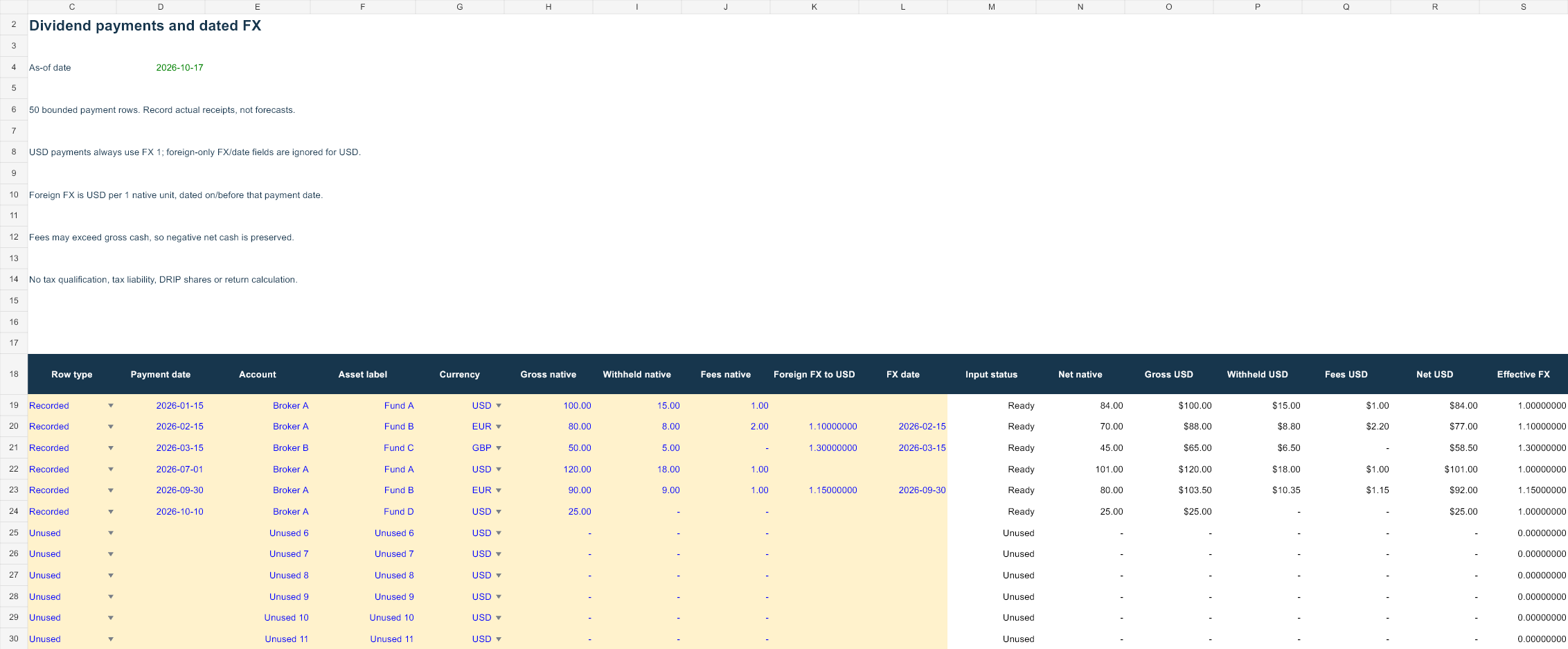
Dividend log contains fifty bounded payment rows. For a recorded payment, enter the payment date, account, asset label, currency, gross amount, withholding and fees. All three native cash amounts are required, including zero when a deduction was absent. Withholding cannot exceed gross. Fees can exceed the receipt, and a negative net cash result is preserved.
The supported currencies are USD, EUR, GBP, CAD and AUD. For a USD payment, the effective rate is always 1 and the foreign-only FX/date inputs are ignored. For another currency, enter a positive USD-per-native-unit rate and its date on or before the payment date. The payment must be on or before the selected as-of date.
Convert each payment on its own basis
Native net is gross less withholding and fees. Gross USD, withheld USD and fees USD each round to cents after applying the payment’s rate. Net USD is their difference, so the USD cash reconciliation stays explicit. It can differ by a cent from translating an already rounded net amount under another convention.
This is an entered-rate record, not an automatic historical FX or tax calculation. It does not choose the legally applicable exchange rate for your jurisdiction. If a broker has already reported base-currency cash, retain that source evidence and use consistent inputs rather than converting the same amount twice.
Reproduce the invented year
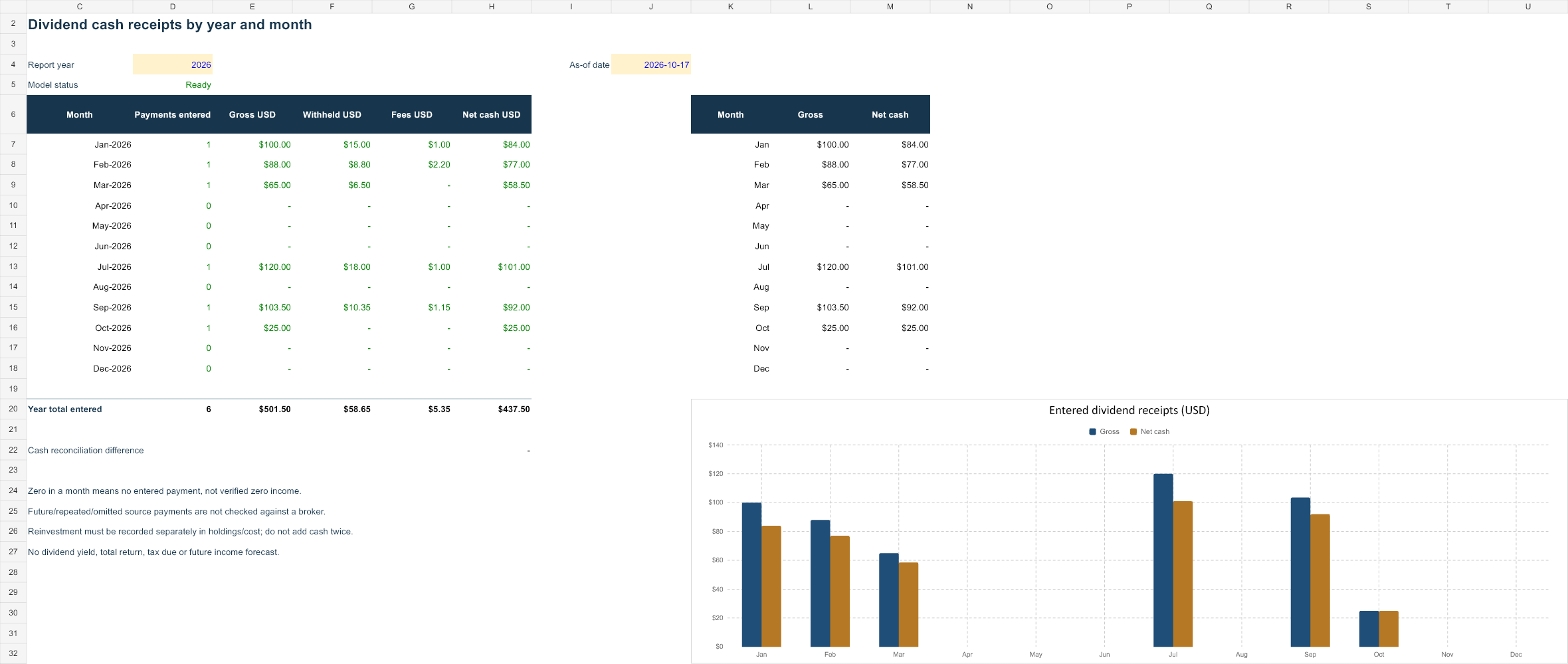
The six sample payments include USD, EUR and GBP receipts. Gross translated cash totals USD 501.50; withholding is USD 58.65 and fees USD 5.35. Net cash is USD 437.50. The summary displays payment counts and gross, withholding, fees and net by month and for the selected year.
A month with zero totals has no entered matching payment; it is not verified evidence of zero income. The log is not matched to a broker. Repeated, omitted or corrected payments require source reconciliation. Negative/reversal source items are outside this nonnegative-gross input model and should not be silently entered as positive receipts.
Keep reinvestment separate
A dividend reinvestment includes a receipt and a purchase. This file records cash receipt and deductions only. It does not create shares, increase entered cost in the holdings workbook or move money between accounts. If a broker’s current holdings already include reinvested shares or dividend cash, adding the receipt to that value again would double-count it.
Qualified dividend status, ordinary-income classifications, return of capital, withholding credits and tax due require separate records and rules. The file does not prepare a tax return, forecast future payments or compute yield or total return. The monthly chart shows the cash you entered, not an income promise.
Change the year without rewriting the log
Summary filters payments by the selected year and calendar month. The as-of date limits which actual payments are accepted; a report year after that date is unavailable. Invalid recorded rows prevent complete totals, even if the error is outside the selected year, so incomplete records are not silently ignored.
Unused rows require zero gross, withholding and fees. To extend beyond fifty rows, update every validation, summary and bounded formula range. Save a working copy before entering personal account labels.
Open, edit and verify your copy
Open in Microsoft Excel and save a dated working copy before replacing blue inputs. Native Excel recalculation, representative edits and save/reopen were checked in disposable copies. Missing required inputs differ from a deliberate zero. Read the row status and restore valid inputs before relying on a complete total.
XLSX can be imported into other spreadsheet applications, but native Google Sheets layout, formulas and charts have not been tested here. Inspect a converted file before using it. Your records stay on your device or chosen storage service; this site does not accept uploads or account credentials. Normal hosting can log page and download requests.
Definitions and primary sources
Investor.gov: Figure out your finances · Investor.gov: Asset allocation and rebalancing · FINRA: Return and rate of return · IRS: Dividends and distributions
Sources provide definition context. Workbook layouts, formulas and all examples are original AllMarkets material, not official agency templates or a tax/financial reporting certification. Sources checked 17 October 2026.