Record what happened
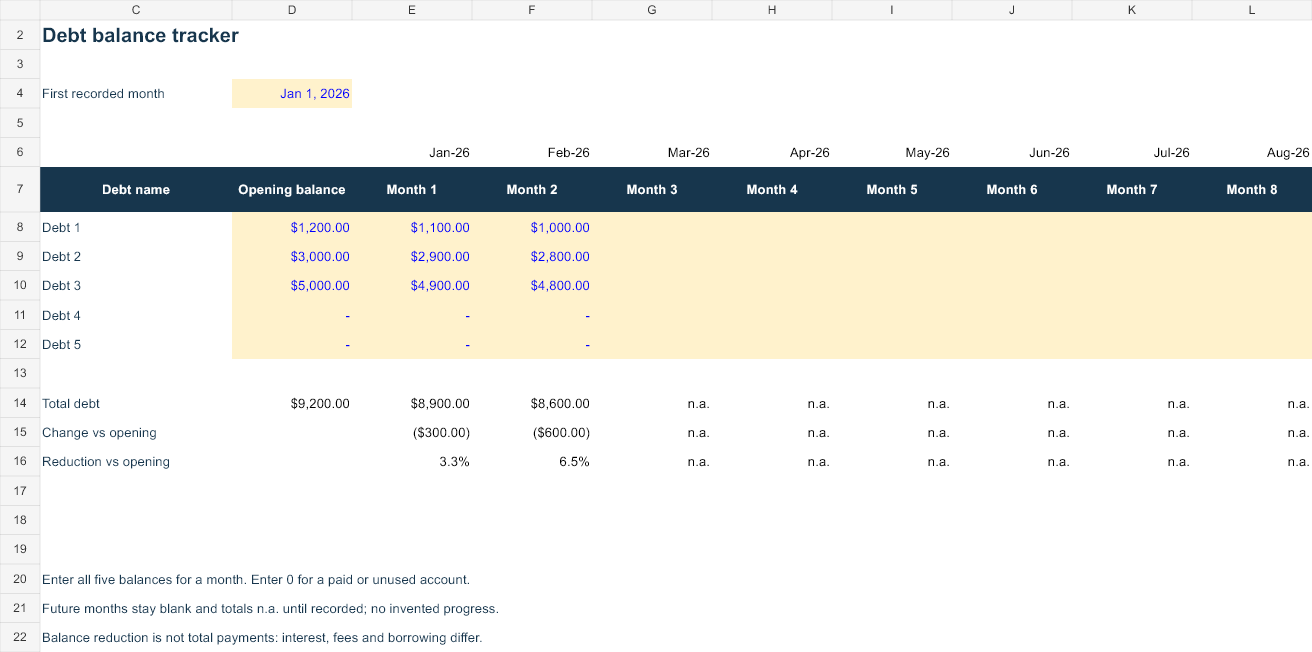
This workbook records five debt balances across twelve labelled months. Opening balances establish the comparison point. Each month’s total requires a numeric balance for all five accounts, including zero for paid or unused accounts. The first two months contain invented examples; later months intentionally remain blank.
The total debt row sums the five entered balances for a completed month. Change versus opening subtracts the original combined debt. Reduction versus opening divides the reduction by the opening total when that total is positive. A negative reduction indicates the recorded balance increased. It is not hidden by a zero floor.
Reproduce the example
Opening debt is $9,200. The first recorded month contains $1,100, $2,900 and $4,900 across the three active accounts, with the other two at zero. Total debt is $8,900, a $300 reduction and approximately 3.3% of the opening total. The second month totals $8,600, or a $600 reduction.
Later months show n.a. until you enter every balance. Clearing one recorded balance makes that month’s total and progress unavailable. Entering an actual zero preserves the zero and includes the remaining accounts. These behaviours keep incomplete information distinct from a paid-off debt.
Use a consistent recording date
- Save a copy and replace the account labels and opening balances.
- Set the first recorded month. The month labels advance from that date.
- Choose a consistent statement-date or month-end basis across your records.
- Enter all five balances for each completed month.
- Retain the statements or other records that support your entries.
A balance reduction is not a measure of payments. Interest, fees, new purchases, transfers and principal payments all affect balances differently. If debt increased, reconcile the change rather than treating it as a broken formula. The tracker does not reconstruct a payment ledger from month-end values.
Keep forecasts separate
Use the repayment planner for conditional future payments. Use this tracker for actual observations. Comparing the two can reveal a missed payment, changed rate or additional borrowing, but this workbook cannot identify the cause automatically. It contains no bank import, collection workflow, creditor communication or prediction of credit-score effects.
Open, edit and save
Open the XLSX in desktop Excel and save a working copy before changing blue inputs. Native Excel recalculation, representative input changes and save/reopen are checked before publication. Google Sheets can import XLSX through File → Import → Upload, but native Sheets rendering and calculation have not been verified. Review formulas, date handling and charts after conversion.
Your edited workbook stays on your device or the storage service you choose. This page serves files and runs an optional local browser model. It does not connect to creditors, collect account identifiers or upload your financial records. Normal hosting can log page and file requests.
Sources and calculation basis
The CFPB description of debt reduction strategies explains paying minimums across debts and directing extra money to a selected priority. Its explanation of credit-card interest describes why real statements may use daily balances and different rates. These sources support the concepts. All workbook layouts, monthly model conventions and invented USD examples here are AllMarkets material.