Editable spreadsheet · One currency · No signup
Linear-position trading journal
Record closed-trade net P/L, R multiples and explicit open positions.
Download Linear-position trading journal (.xlsx)
Includes a blank “Your plan” worksheet and an “Example” worksheet. All example numbers are invented. Version 1 · 16 October 2026.
What this file does
Log fifty positions with side, entry, exit, quantity, price multiplier, total fees and initial monetary risk. Closed valid rows calculate gross and net P/L and R. The summary reports closed count, net P/L, win rate, profit factor and breakeven trades.
How to use it
- Download and keep a fresh copy of the original.
- Open “Your plan” and type into the blue input cells. Black cells contain formulas.
- Use 1 for a long and −1 for a short. Enter positive quantity, multiplier and initial monetary risk in one account currency. Leave exit blank for an open trade; type zero fees explicitly if there are none.
- Review the Example tab to understand the calculation, then reconcile your entries with your own records.
Reproduce the example
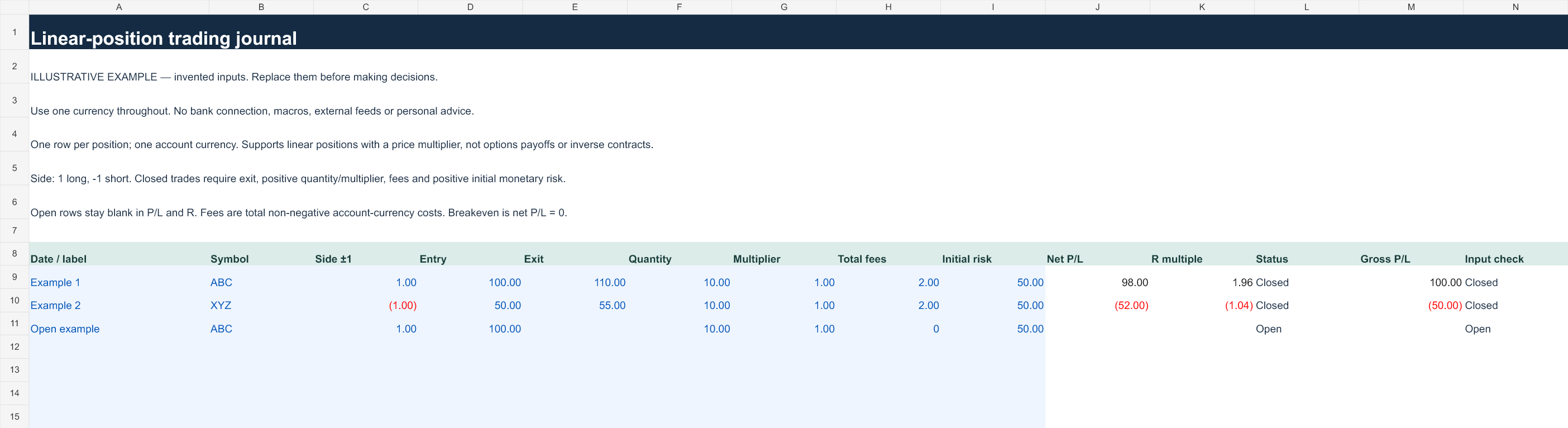
A long from 100 to 110 with quantity 10, multiplier 1, fees 2 and risk 50 nets 98 (1.96 R). A short from 50 to 55 with the same size and fees nets −52 (−1.04 R). Combined net P/L is 46; the open example is excluded.
Preview the example worksheet
Scope and limits
Only linear positions are supported. This is not an options payoff or inverse-contract model. Profit factor is gross positive net results divided by the absolute total of negative net results; it is unavailable without losses. Breakeven closed trades remain in the win-rate denominator.
Inputs remain in the file you use. The workbook contains no account integration, macros or external feeds. Uploading it to a cloud spreadsheet service is your own action and subject to that service's settings. Keep financial files private.
Open in Excel or import into Google Sheets
In Excel, open the XLSX and allow normal formula recalculation. In Google Sheets, use File → Import → Upload, choose the file and create a new spreadsheet. Check the Example tab values above after import before entering personal data. Native Google Sheets rendering has not been independently verified; formatting or calculation differences should be checked.
Formula and validation notes · Related interactive tools · Use these resources in a lesson or article