One forecast connects all three statements
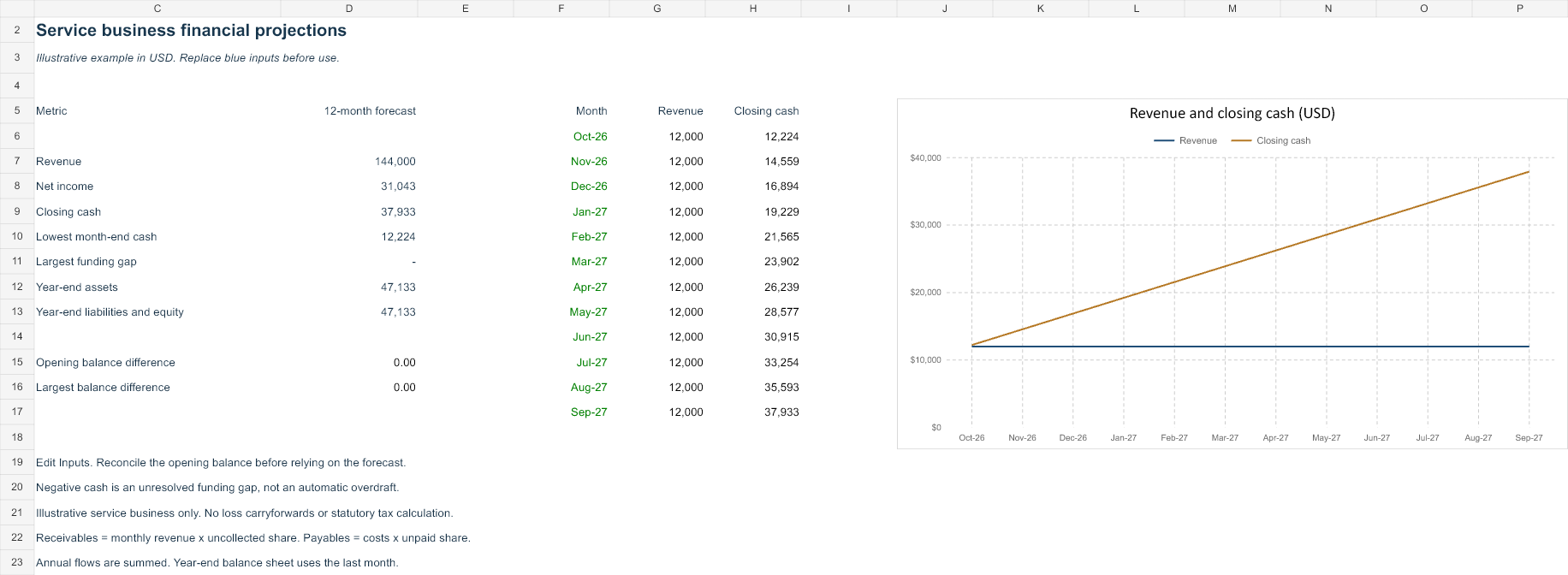
The model is designed for a small service business without inventory. The Inputs sheet owns opening balances, the start date and monthly drivers. Forecast calculates income, cash flow and the balance sheet in one chronological build. Summary links the finished results and a chart of revenue and closing cash.
Monthly revenue equals billable units multiplied by price. Direct costs use the entered revenue percentage. Operating costs are entered separately. Depreciation is capped at opening net fixed assets plus current capex. Interest uses opening debt and the entered annual interest rate divided by twelve. Tax is the entered rate times positive monthly pretax profit, with no loss carryforward or statutory tax determination.
Collections and payments affect cash
Month-end receivables equal that month's revenue times the entered uncollected share. Payables equal direct costs plus operating expense, multiplied by the unpaid share. These simplified month-end balance assumptions are not a detailed receivables ageing model or a number-of-days collection rule.
Operating cash starts with net income, adds depreciation, subtracts the increase in receivables and adds the increase in payables. Capex, borrowing, principal, owner contributions and distributions then lead to closing cash. That same closing cash appears on the balance sheet. Capital and retained earnings roll forward rather than receiving a balancing plug.
Start from reconciled balances
The invented opening position contains $10,000 cash, $2,000 receivables and $5,000 net fixed assets. These $17,000 assets are financed by $1,000 payables, $3,000 debt and $13,000 capital. Opening retained earnings is zero. Replace all seven amounts and confirm the opening difference is zero before relying on the projection.
The start-date input must be the first day of a month. It updates the twelve chronological period labels and chart labels. The example starts October 2026. Edit the later months independently when prices, demand, operating costs or payment timing will change.
Review funding and debt requests
Negative projected cash remains visible as a funding gap. New borrowing occurs only when entered. Requested principal repayment is capped at opening debt plus that month's draws; any excess request is shown separately. This avoids a negative loan balance without pretending the entire requested payment happened. Interest on new draws begins in the following month under the stated opening-balance convention.
The Summary shows annual revenue and net income, final cash, the lowest month-end cash, the largest funding gap and the balance reconciliation. Annual flows are summed; balance-sheet amounts use the last forecast month. A missing required driver makes the affected projection and dependent future cash balances unavailable.
Use and limits
- Save a copy and reconcile opening balances.
- Replace every monthly driver in Inputs, including deliberate zero values.
- Inspect cash timing, funding gaps, depreciation caps and repayment requests.
- Change a late-month driver and confirm the related statements and chart update.
- Keep your forecast assumptions and actual results in separately dated versions.
This model excludes inventory, VAT, payroll accruals, loss carryforwards, loan fees, FX and detailed statutory depreciation. Tax is assumed paid in the same month as the modelled expense. Distributions reduce retained earnings. Use a more detailed model when these simplifications materially affect your business.
Opening and saving the file
Open the downloaded XLSX in desktop Excel and save a copy before editing blue input cells. Formulas, representative input changes and save/reopen were tested in Microsoft Excel. Google Sheets can import XLSX through File → Import → Upload, but native Sheets rendering and recalculation have not been verified. Check formulas and charts after any conversion.
Keep financial records on a device and account appropriate for your business. This website serves the template; it does not receive your edited workbook or connect to a bank.
Definitions and further reading
The SEC introductory guide to financial statements explains why position, earnings and cash describe different financial information. The SBA business-management resources provide broader small-business context. These sources support the definitions; the original workbook layouts and invented examples are AllMarkets material.
Full methodology and limitations · Compare all four templates